
Download Nexus AI – Powerful AI Writing Assistant for Content Creation
Overview
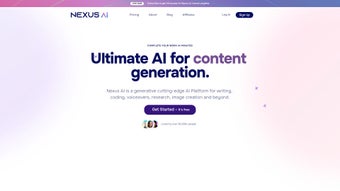
Nexus AI is a comprehensive AI‑driven platform built to streamline every stage of content production. Whether you are a student drafting a research paper, a marketer generating blog posts, a developer looking for code snippets, or a designer needing quick visuals, Nexus AI delivers a single, secure workspace that handles writing, editing, paraphrasing, voice‑over creation, and image generation. The tool shines in academic environments thanks to its citation generator and smart editing engine, while business users benefit from the article wizard, multilingual support, and seamless CMS integration.
Security is baked in: all data is encrypted both in transit and at rest, and the platform complies with major privacy standards. With flexible pricing that includes a free tier and premium plans for teams, Nexus AI positions itself as an essential ally for anyone who produces digital content on a regular basis. Its intuitive dashboard provides real‑time analytics, showing word counts, readability scores, and usage statistics, helping users refine their workflow and measure the impact of each piece of content.
In short, Nexus AI isn’t just another text generator—it’s a full‑stack content creation ecosystem that adapts to both creative and technical demands.
Key Features & Capabilities
- AI Writing Engine – Generates articles, essays, marketing copy, and social media posts with contextual relevance and brand‑tone consistency.
- Smart Editing & Paraphrasing – Offers grammar correction, style suggestions, and the ability to rewrite passages while preserving meaning.
- Academic Toolbox – Includes a citation generator (APA, MLA, Chicago) and a plagiarism checker to ensure scholarly integrity.
- Article Wizard – Guides users through topic selection, outline creation, and final draft in a step‑by‑step flow.
- AI Image Generator – Turns textual descriptions into high‑resolution images using diffusion models, ideal for blog headers and presentation slides.
- Voice Cloning & Voice‑Over Studio – Produces realistic spoken audio from text, with customizable pitch, speed, and emotion.
- Code Assistant – Suggests snippets in multiple programming languages, explains algorithms, and helps debug simple errors.
- Multilingual Support – Writes and translates content in over 30 languages, maintaining cultural nuance.
- Analytics Dashboard – Tracks word count, readability, SEO score, and usage trends across projects.
- Integration Suite – Connects with WordPress, Drupal, HubSpot, and Google Docs for seamless publishing.
- 24/7 Customer Support – Live chat, email, and a growing knowledge base ensure quick issue resolution.
- Robust Security – End‑to‑end encryption, two‑factor authentication, and GDPR compliance protect user data.
Each feature is designed with a focus on productivity and quality. For example, the AI Image Generator leverages text‑to‑image diffusion to create visuals that match the exact tone of your article, eliminating the need for separate graphic design tools. Meanwhile, the voice cloning module can replicate a brand’s signature voice, allowing marketers to produce consistent audio ads without hiring voice talent for every iteration. By consolidating these capabilities under one roof, Nexus AI reduces tool fatigue and accelerates time‑to‑publish, making it a compelling choice for freelancers, agencies, and educational institutions alike.
Installation, Usage & Compatibility
Getting started with Nexus AI is straightforward. After visiting the official website, click the “Download” button that matches your operating system. The installer size is under 150 MB, and the process takes less than five minutes on a typical broadband connection.
Once installed, launch the application and create a free account using an email address or single sign‑on with Google or Microsoft. The onboarding wizard walks you through profile setup, preferred language, and whether you’ll focus on writing, coding, or multimedia creation. From the main dashboard, you can start a new project, select a template (e.g., blog post, research paper, code snippet), and let the AI generate a first draft within seconds.
Nexus AI runs natively on Windows 10/11, macOS 12+, Linux (Ubuntu 20.04+), and offers mobile apps for Android 8+ and iOS 13+. All platforms share the same feature set, thanks to a cloud‑backed architecture that syncs your work in real time. This cross‑device compatibility ensures that you can begin a document on a desktop, edit on a tablet, and finalize on a smartphone without losing any formatting or AI context.
Pros
- All‑in‑one solution reduces the need for multiple subscriptions.
- High‑quality AI image and voice outputs that rival dedicated tools.
- Strong academic features such as citation generation and plagiarism checks.
- Responsive 24/7 support and extensive documentation.
- Robust security with encryption and GDPR compliance.
Cons
- Premium plans can be pricey for solo freelancers on a tight budget.
- Advanced image generation may require a stable internet connection for best results.
- Learning curve for the full suite of features, especially the code assistant.
Overall, the installation experience is frictionless, and the intuitive UI makes daily use feel natural. The platform’s cloud sync ensures that you never lose progress, and the ability to export projects in DOCX, PDF, Markdown, or HTML formats adds flexibility for downstream workflows. Whether you are drafting a 10‑page thesis or producing a quick social media graphic, Nexus AI adapts to the task at hand while maintaining high performance across all supported devices.
FAQ & Final Verdict
Is there a free version of Nexus AI?
Yes, Nexus AI offers a free tier that includes basic writing, editing, and image generation features. The free plan is ideal for students and hobbyists who need occasional assistance.
How secure is my data when using Nexus AI?
Nexus AI uses end‑to‑end encryption, stores data in GDPR‑compliant servers, and offers two‑factor authentication. Your content is never shared with third parties without explicit consent.
Can Nexus AI integrate with my existing CMS?
Yes, the platform includes native plugins for WordPress, Drupal, HubSpot, and a generic API that allows integration with most modern content management systems.
Does Nexus AI support multilingual content?
Absolutely. Nexus AI can write, translate, and edit content in over 30 languages, maintaining tone and cultural relevance across each locale.
What kind of customer support is available?
Users have access to 24/7 live chat, email support, and a comprehensive knowledge base that includes tutorials, video guides, and community forums.
Conclusion & Call to Action
Nexus AI stands out in a crowded market by delivering a truly all‑encompassing AI workspace. Its blend of writing assistance, code suggestions, image synthesis, and voice cloning eliminates the need for multiple niche tools, saving both time and money. While the premium subscription may be a consideration for freelancers, the free tier offers enough functionality to evaluate the platform’s core strengths. Security, cross‑platform compatibility, and extensive integration options further cement Nexus AI as a reliable partner for creators, educators, and businesses alike.
If you’re ready to accelerate your content pipeline, enhance the quality of your drafts, and explore cutting‑edge AI visuals and audio, download Nexus AI today. Take advantage of the free trial, test the article wizard, and experience the seamless workflow that only an integrated AI suite can provide. Your next high‑impact article, polished code snippet, or striking visual is just a click away.






